| What it is | CapCad's layer of design and material directives: rules that, given the alignment's properties at a station, return the value the norm requires there |
| Commands | CAPCAD_CRITERIA · CAPCAD_CRITERIA_MATERIAL · CAPCAD_CRITERIA_DATASET · CAPCAD_CRITERIA_MATERIAL_DEFAULT · CAPCAD_CRITERIA_TECHNICAL_DEFAULT |
| Where the set is chosen | Project Manager, Main tab, Criteria: Technical field — written to the project configuration and mirrored into the alignment's properties |
| Where the sets come from | CapCloud, as presets of type Criteria |
| Where it is already consumed | Alignment Manager, Lanes tab, Criterion combo |
| Hosts | The five commands exist in AutoCAD; on ARES Commander they say "coming soon". They are not registered in BricsCAD, GstarCAD or ZWCAD |
Style takes care of the deliverable; criteria take care of the directive. The style says what the project looks like — layers, sheets, reports. The criterion says what the norm requires at that point of the road, given the speed, the traffic volume and the road class.
- The norm becomes a table, not code. A criterion is a small two-column table: the input value and the result. Changing norm is changing table.
- Per station, not per drawing. The input comes from the alignment's properties, which change along the road — so the result changes with them.
- One set per project. The project chooses the criteria set it follows, and the drawing carries that choice with it.
- It already works where it matters first. The edge and centre lines drawn by the Alignment Manager pick the right layer for each speed band on their own.
- It never blocks. A criterion that does not answer returns empty, and the caller uses the value you typed. Nothing waits on the cloud.
- Defaults as a safety net. What the criterion does not resolve, the project's default values resolve.
What a criterion is
CapCad separates two things that usually live together in an office:
- Style organises the deliverable — layers, sheets, reports, the look of the signing.
- Criterion organises the design directive and the material — what the norm requires on that stretch of road.
A style mistake is "the title block is wrong". A criterion result is "at this station, at this design speed, the edge line is the one with cadence 12" or "at this traffic volume, the sign substrate is that one".
The shape of a criterion
Each criterion has:
| Field | What it is |
|---|---|
| Input type | The alignment property that supplies the argument: VelocidadeDiretriz (design speed), VDM (average daily traffic), LarguraPista (carriageway width), rodovia.classe (road class)… The same ones you edit in the alignment's properties. |
| Return type | The quantity produced: Lfo2Layer, PlacaSubstrato, BordoEsqLayer… |
| Values | The table that translates one into the other. |
| Description | Free text explaining the criterion. |
| Attribute tag | Optional: the block attribute tag this criterion fills. It is read by a single consumer — attribute filling on sign insertion. |
| Enabled | Only on the alignment's local criteria: it lets you switch an item off without deleting it. |
The criterion's name is the first two fields joined by a dot: VelocidadeDiretriz.Lfo2Layer, VDM.PlacaSubstrato. It is by that compound name that it is referred to everywhere.
The value table
The table has two columns and is read in two different ways, according to what is in the first cell:
Numeric table — bands. When the first column of the first row is a number, each row is the lower bound of a band:
40,SINA_HOR_AM_TA8_LFO3
60,SINA_HOR_AM_TA12_LFO3
80,SINA_HOR_AM_TA16_LFO3
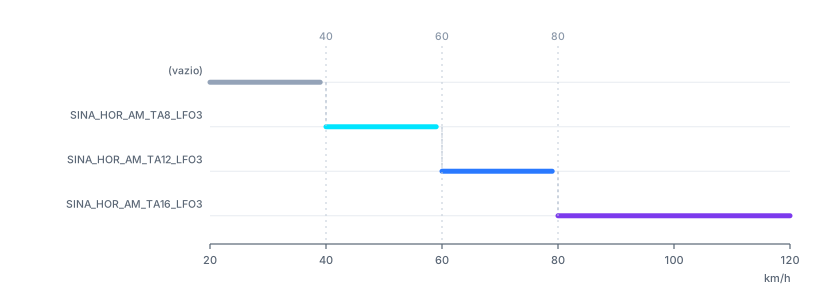
What the table above returns for each speed from 20 to 120 km/h, produced by running CapCad's own resolver. Note the start: below the first bound the criterion returns empty, not the first row.
That detail is deliberate and important: a 30 km/h road, on the table above, does not get the 40 row. The criterion simply does not answer, and whoever called it uses the value the user chose. From the last bound upwards, the result is the last row's — 120 km/h returns the same thing as 80.
Text table — keys. When the first cell is not a number, the whole table is read as text keys, compared exactly (but case-insensitively):
Rural,SINA_HOR_BR_TA12_LBO
Urban,SINA_HOR_BR_TA6_LBO
Rural and rural find the same row; Local finds nothing and returns empty.
Expressions. A table containing an equals sign (=) anywhere is treated as an expression rather than a table. In this version expressions are not evaluated: the criterion returns empty and the message expression tables are not evaluated yet.
Criteria sets
Criteria do not live loose: they live in sets, which are presets kept in CapCloud under the type Criteria. One set ships, and it is the default.
The project chooses its set in the Main tab of the Project Manager, in the Criteria: Technical field. The name is written to the project configuration and mirrored into the alignment's properties, so that a drawing taken to another project still knows which set it was made against.
An alignment can also carry local criteria, written into its own properties, each with its own on/off switch. When both exist, the dictionary the consumers see is the merge of the two — and a cloud criterion with the same name overrides the local one.
Where criteria are already used
Edge and centre lines, by speed band
This is the live consumer. In the Alignment Manager, Lanes tab, the Criterion combo offers the empty entry (the default) and the one set that ships. Once a set is chosen, the alignment is partitioned by design-speed bands before drawing, and each stretch consults the criterion matching the line it is about to draw:
| Line drawn | Criterion consulted |
|---|---|
| Left edge line | VelocidadeDiretriz.BordoEsqLayer |
| Right edge line | VelocidadeDiretriz.BordoDirLayer |
| LFO-2 | VelocidadeDiretriz.Lfo2Layer |
| LFO-3 (stud line) | VelocidadeDiretriz.Lfo3TachasLayer |
| LFO-4 | VelocidadeDiretriz.lfo4cadenciaLayer |
| LMS-2 | VelocidadeDiretriz.Lms2cadenciaLayer |
The result is the layer name to use on that stretch — and since a CapCad layer name is a sentence (SINA_HOR_AM_TA12_LFO3 already states colour, cadence and function), choosing the layer is choosing the marking.
In three situations the criterion does not answer and the layer you chose on the form stands:
- the Criterion combo is empty;
- the stretch has no design speed set;
- the set does not carry that item, or the value falls below the table's first bound.
With no speed band at all defined on the alignment, the Manager says No design-speed bands found on the alignment — the lanes are built unpartitioned. and draws everything with one layer.
Sign attribute filling
Not available in this version. On sign insertion, the option of filling attributes from the criteria — each criterion with an attribute tag writing its result into the matching attribute, evaluated at the sign's station — is not applied: the insertion uses the default values instead.
Materials
Substrate, film and support are material criteria. In this version, what fills them are the project's default value lists — the Default Materiais and Default Diretrizes tabs of the Project Manager. That tab's own note says as much: when a material criterion is not set or not found, the default values below may be applied.
The commands
CAPCAD_CRITERIA_MATERIAL_DEFAULT — material default values
Opens the Project Manager straight on the Default Materiais tab: the two lists (vertical and horizontal) of values that step in when the material criterion does not answer. On the vertical side they feed the blocks' attributes; on the horizontal side they are attached as XData.
Ribbon: no button in this version.
CAPCAD_CRITERIA_TECHNICAL_DEFAULT — directive default values
The same form, on the Default Diretrizes tab: the same structure, for the technical criteria.
Ribbon: likewise, no button.
CAPCAD_CRITERIA_DATASET — the material datatypes
Opens the same metadata form as CAPCAD_ALIGNMENT_DATASET, but loaded on the Material dataset and with the selector free (the alignment command pins it to Eixo). It lists the datatypes — the recognised property names and their description — fetched from CapCloud.
It is a browser: the Save button closes the window; writing edited metadata back is not available in this version, and the command line says so.
Ribbon: CapCad tab › Project panel › Critérios; it also appears on the Alignments panel (as DataTypes Materiais) and on BIM (as Biblioteca Materiais).
CAPCAD_CRITERIA and CAPCAD_CRITERIA_MATERIAL — not available in this version
The two commands that would open the viewing and editing of criteria sets — an alignment's geometric criteria and its material criteria — are not available in this version. Calling them shows a warning saying so.
What works without them: choosing the project's set (Project Manager), consuming the geometric criteria (Alignment Manager, Lanes tab) and maintaining the default values (the two default tabs).
Ribbon: CapCad tab › Alignments panel › Critérios: Propriedades Eixo x Definições Técnicas (CAPCAD_CRITERIA) and Critérios: Propriedades Eixo x Materiais (CAPCAD_CRITERIA_MATERIAL). The buttons lead to the warning.
How a criterion is resolved, step by step
- Someone asks for a criterion by name —
VelocidadeDiretriz.Lfo2Layer. - The name is looked up in the active set's dictionary (cloud plus the alignment's local items). Not found: criterion required not found in the current Criteria Set, and the result is empty.
- From the criterion, the input type (
VelocidadeDiretriz) is read and the alignment is asked for that property's value at the station in question. Not there: Dataset not found on the current alignment, and the result is empty. - That value is used to look up the value table — by band if numeric, by key if text.
- The result comes back as text. Empty means "the criterion did not answer", never "the criterion answered empty": the caller uses its own fallback value.
Capvars: a criterion inside a string
So that one field can take either a literal value or a criterion, CapCad uses capvars: an @ followed by the criterion's name, inside any text.
<@VDM.PlacaSubstrato@>
The reading is: find the first @ and take the longest run of letters, digits, _ and . after it — the first of them must be a letter. What came before and what comes after are preserved, and the resolved value goes in between. A text without @ comes back untouched: that is how the same parameter accepts either SINA_HOR_AM_LFO2 or @VelocidadeDiretriz.Lfo2Layer.
The closing @ is not part of the syntax — there is no end delimiter. In <@Name@>, the token is Name, with < before and @> after.
Notes
- Editing criteria has no interface in this version. Choosing the project's set, yes; creating or changing a criterion, no. The two commands that would do it are not available in this version.
- Below the first bound, a numeric table returns empty. This is the correct and deliberate behaviour, but it surprises anyone expecting the first row to hold "for everything up to 60". If you want it to, start the table at
0. - A table with
=in any cell becomes an expression — and expressions are not evaluated in this version. An equals sign inside a description or a layer name, dropped into the table by mistake, switches the whole criterion off. - A criterion's name is the whole pair.
Lfo2Layeron its own finds nothing: the name isVelocidadeDiretriz.Lfo2Layer. - Cloud overrides local. When merging the cloud's criteria with the alignment's local ones, the cloud item wins where the names coincide. Do not count on a local criterion to override one from the set.
- The sets come from the cloud. With no access to the presets service, no criterion answers and everything falls back to the values you typed. The query has a time limit and fails silently: the CAD never sits waiting.
- A criterion is not the same as the curve criteria. The radius and superelevation limits the curve analysis applies are that command's own tables, and do not go through this subsystem.
- The five commands are AutoCAD commands. On ARES Commander they exist and say "coming soon"; in BricsCAD, GstarCAD and ZWCAD they are not registered.